Canary releases for microfrontends
A canary release serves a new version of a microfrontend to a fraction of your traffic while everyone else keeps the stable one. MFE Orchestrator takes that decision per microfrontend and entirely server-side: the host page never learns which side of the split it got, and does not need to.
Enabling a canary
Open the microfrontend. Release is the first card of the form and it sits above the tabs, so it is on screen whichever of General, Hosting, Repository or Danger Zone is selected: the version and the canary decide which bytes a browser gets, and they are not something you should have to go looking for. Under the version, past a divider, is Canary Settings and its switch.
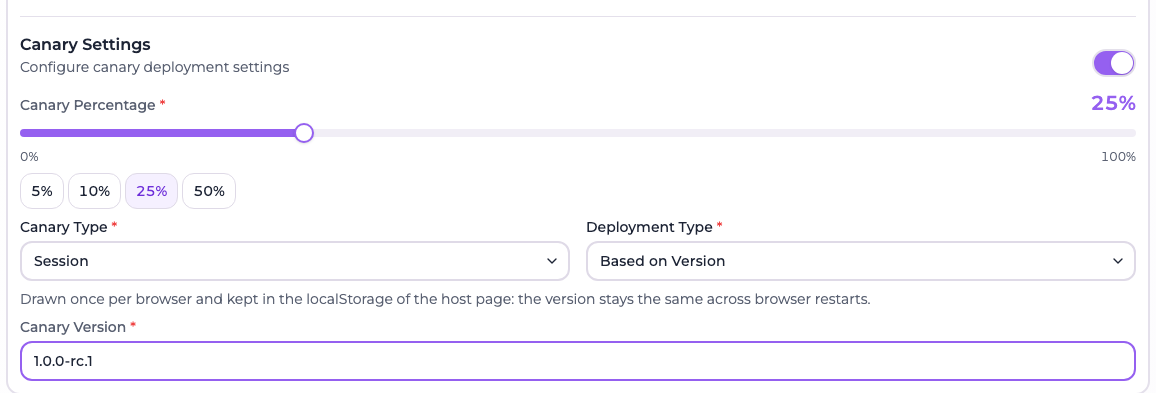
Turned on, the section asks for four things, in this order:
| Field | Meaning |
|---|---|
| Canary Percentage | Share of traffic that should receive the canary, as a slider with 5, 10, 25 and 50 presets. Not asked for by User, which enrols people instead of splitting traffic |
| Canary Type | Who gets the canary — Random, Session or User |
| Deployment Type | What the canary is — Based on Version or Based on URL |
| Canary Version / Canary URL | The target, depending on the deployment type |
A sentence under the two selects spells out what the selected type does, because the three names are not enough to tell them apart. The percentage has to be between 1 and 100 while the canary is enabled — 0 is refused, which is deliberate: a canary configured to reach nobody is a misconfiguration and not a way to switch it off. Turning the switch off is.
Canary configuration is part of the microfrontend, so like everything else it is captured in a deployment and only becomes live once you deploy. Expanding a deployment under Deployments shows a card per microfrontend with its stable version, the two types, and the canary share — or Enrolled users, for a User canary, which has no share. It is the quickest way to confirm what a deployment will actually do.

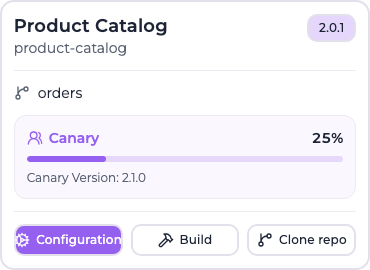
The microfrontends list carries the same information in shorter form. A grid card shows the share as a bar with the canary version underneath; the table view gives it a column of its own, next to a Canary Version column, and says No canary for the microfrontends that have none.
Who — the canary type
The three types answer two different questions, and it is worth being clear about which one you are asking.

| Canary Type | Who gets the canary | Sticky? |
|---|---|---|
| Random | A share of every page load, drawn fresh each time | No — the same browser flips between versions on every refresh |
| Session | A share of browsers, drawn once per browser | Yes — survives a reload, a new tab and a browser restart |
| User | Only the users you enrol, no matter how many they are | Yes — it is a decision, not a draw |
Random and Session are the same percentage split and differ only in whether the draw is remembered. User is not a split at all: the percentage plays no part in it.
The identity the split is computed on travels in the query string of the calls your host makes to the serve API, and the client SDK generates, persists and sends it for you:
| Query parameter | What it identifies | Where the host keeps it | Used by |
|---|---|---|---|
mfeDeviceId | The browser | localStorage | Session |
mfeUserId | The logged-in user | Supplied by your application | User |
mfeSessionId | The browsing session | sessionStorage | No canary strategy — the SDK still sends it, and exposes it, for your own telemetry |
The host sends every identity it holds and is never told which one was used, nor the percentage, nor whether a canary exists at all. Switching a microfrontend from one type to another is therefore a console change only — nothing to redeploy on the host side.
:::info No cookie is involved, and none can be
An earlier version of this feature had a Cookie Based type, and the name was misleading:
no cookie is involved anywhere here, and none can be. Microfrontends are loaded with a
cross-site import(), and module scripts are fetched with a fixed same-origin credentials mode,
so a cookie belonging to the MFE Orchestrator domain is never attached to those requests and a
Set-Cookie on their responses is never stored. This is how module scripts are specified in every
browser, not a Safari or ITP quirk — verified in Chromium with third-party cookies enabled and a
SameSite=None; Secure cookie already in the jar. The host page is the only place that can hold
this state, and the URL is the only way to hand it over.
That is why Session means "an identity that outlives the browser session", kept in localStorage
by the SDK. If you would rather keep it in a first-party cookie of your own domain, read it
yourself and pass it as mfeDeviceId.
The old On Sessions and Cookie Based types no longer exist. Microfrontends still configured with either of them — and the microfrontend snapshots inside deployments already shipped — are converted to Session automatically, by a migration the backend runs when it connects to the database. Nothing to do on your side. :::
What — the deployment type
| Type | Behaviour |
|---|---|
| Based on Version | The canary is a different version of the same microfrontend, served through its normal hosting configuration |
| Based on URL | The canary is a completely separate URL, which can point anywhere |
Based on Version is the natural choice when the canary is simply the next build. Based on URL is useful when the candidate lives on separate infrastructure — a preview environment, a different CDN — and you want to send a slice of traffic there without registering it as a version.
How the split is computed
Random is what it says: a draw against the percentage, taken once per page load when the manifest is fetched, with nothing stored anywhere.
Session is sticky, and gets there without server-side state and without a draw per request.
The identity and the microfrontend id are concatenated (identity:microfrontendId), hashed with
FNV-1a into one of 100 buckets, and the request gets the canary when bucket < percentage.
Three properties follow from that, and they are the reason it is done this way:
- Stable. The same identity always lands in the same bucket, so a returning browser stays on the side it was on, without anything being stored.
- Monotonic. Raising the percentage only ever adds browsers to the canary; it never moves one back to stable. Measured going from 20% to 40%: zero browsers moved out.
- Independent per microfrontend. The microfrontend id is part of the hashed string, so a browser can be on the canary of one microfrontend and on the stable version of another. A single unlucky user does not get every canary at once.
The distribution is accurate enough to trust the number you type: 25% configured measured 25.1% actual over 4000 identities.
When no identity arrives
- Session falls back to a plain draw per page load, which is to say it degrades into Random. The page load itself stays coherent, because the resolved version is pinned into the URL immediately — but the next reload draws again. Stickiness is exactly what requires the host to send an identity, which is what the SDK is for.
- User does not fall back. Without
mfeUserIdthere is nobody to look up, so every request gets the stable version. That is the intended behaviour for anonymous visitors, not a degradation.
How the version reaches the browser
This is the subtle part, and worth understanding before you debug a rollout.
A canary that rolls out one of your versions does not change the URL of the microfrontend. The manifest returns the usual serve URL with the resolved version already pinned into it as a path segment:
https://console.mfe-orchestrator.dev/api/serve/mfe/files/auto/68f1a2b3c4d5e6f7a8b9c0d1/checkout-new/_v/1.5.0-rc1/assets/remoteEntry.js
Use that URL verbatim. Never rebuild it, and never strip the _v/<version>/ segment.
A microfrontend is many files, and they all come from one build. The draw happens exactly once,
on the entry point, and its result is pinned into that URL; every chunk imported from it inherits
the _v/<version>/ segment, because relative specifiers resolve against the entry point's URL. The
server never draws again for the individual files — a file arriving without a version in its path
is served the deployed version, not a fresh coin flip. With a Random canary that distinction
is the whole ball game: redrawing per file would let one page load half of build A and half of
build B.
Why a path segment and not a query parameter. The entry point imports its chunks with relative
specifiers (./chunk.js), which the browser resolves against the entry point's URL — and that
resolution drops the query string. A version carried in the query would be lost by the first chunk
request.
Why the URL is pinned up front rather than redirected to. The entry point of a canary
microfrontend also answers the versionless URL with a 302 (uncacheable) to the pinned one, as a
fallback for anyone holding a raw URL. That redirect is enough for an ES module, whose relative
imports resolve against the post-redirect URL. It is not enough for a classic script:
document.currentScript.src is the URL before redirects, so a webpack build with
publicPath: 'auto' would compute its chunk base from the versionless URL and fetch chunks from a
different version — two builds mixed into one page. Verified in Chromium: the classic script saw
/mfe/assets/entry.js while an ES module saw /mfe/_v/1.5.0-rc1/assets/entry-esm.js. Pinning the
URL in the manifest removes the redirect from the picture entirely, so both module systems resolve
their chunks on one version.
A Based on URL canary is decided in the manifest instead: there is no version of yours to pin, so the host is simply handed either the canary URL or the stable one.
Verifying which version a browser got
| Tool | What it does |
|---|---|
x-mfe-version response header | Present on every file served for a microfrontend, naming the version those exact bytes came from |
?mfeVersion=<version> query parameter | Forces a specific version, for testing |
mfeVersion is accepted only when the value is one of the versions that deployment can serve —
the deployed version or the configured canary version — so it cannot be used to reach an arbitrary
build.
In practice: open the network panel, find the entry point request, and read x-mfe-version. That
is the ground truth, and it is the only thing the browser is ever told about the rollout.
Canary users
User targeting is an enrolment list, not a split. A user sees the canary when the deployment
carries a row enabling them, and everyone else — including every anonymous visitor — gets the stable
version. Because the decision is taken on mfeUserId, it follows that person onto any browser and
any device.
The list lives on the deployment and covers every microfrontend of it configured as User. Open a deployment under Deployments — the active one or any in the history — and press View canary users.
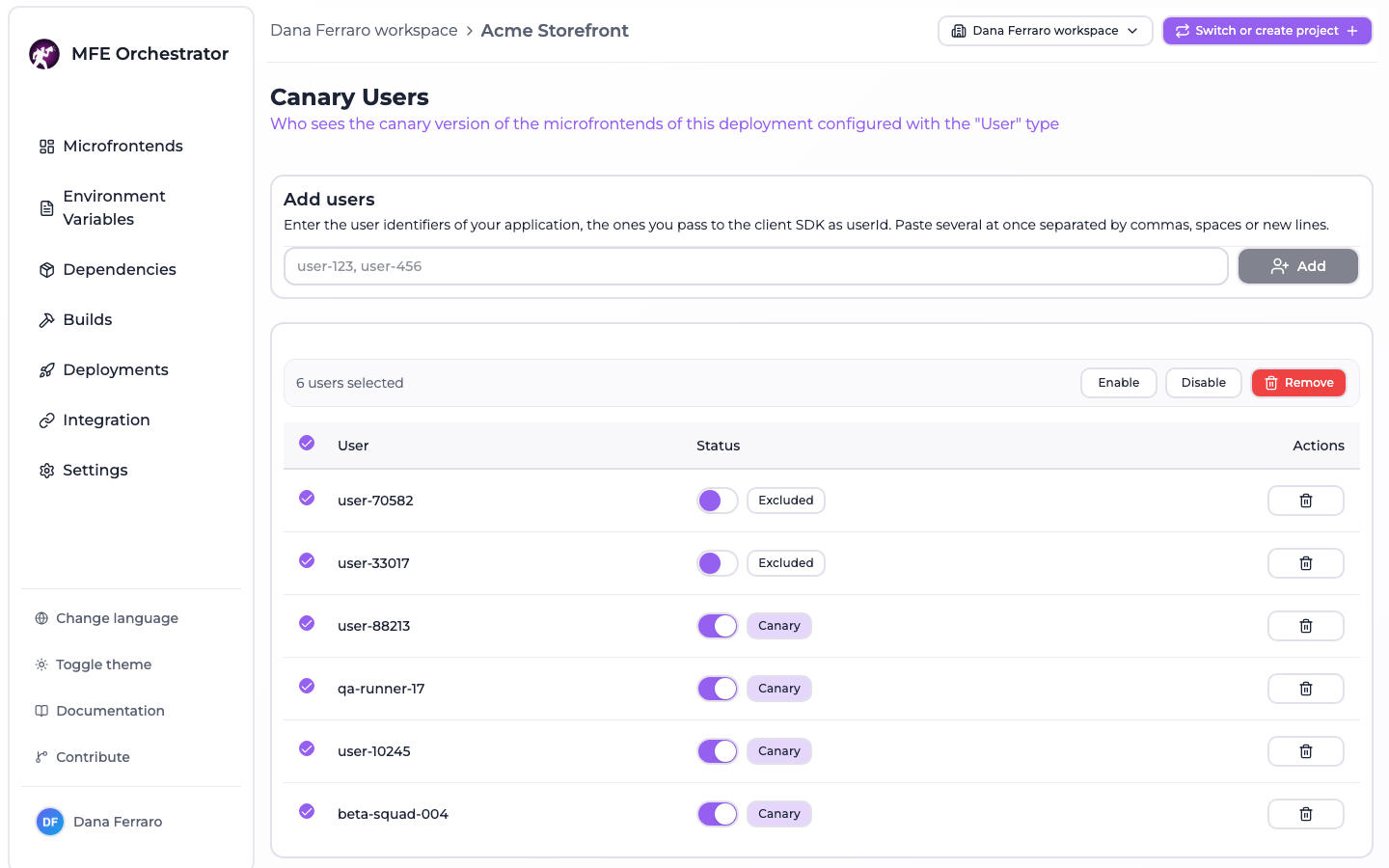
- Add one or more user ids. Paste a list separated by commas, spaces or new lines — semicolons work too — to enrol a whole group in one go; the input de-duplicates, so a list copied out of a spreadsheet or a query result works as it is.
- Toggle a row between Canary and Excluded to suspend someone without losing the entry.
- Remove a row to send that person back to the stable version.
- Select rows with the checkboxes to enable, disable or remove all of them at once — the same three actions, applied to the selection.
Removing a row and disabling it are different entries in the table and the same thing to the resolver: a user with no row and a user with a disabled row both get the stable version.
The ids are the ones your application knows — whatever it passes to the client SDK as userId.
They are opaque strings to the console, which is why the page shows them back rather than names or
email addresses.
Enrolment survives a new deployment
Enrolment is stored per deployment, which taken literally would mean that every deploy starts with nobody on the canary. It does not: creating a deployment copies the rows of the deployment the environment is serving right now into the new one, inside the transaction that creates it. Each row keeps its state, so someone you had disabled stays disabled rather than being re-enrolled.
A redeploy is a different operation — it re-activates a deployment that already holds its own rows, so there is nothing to carry over.
Telling the SDK who is logged in
The host is the only place that knows this, so it has to hand it over. Three shapes, depending on when the user becomes known:
// Known at bootstrap
configure({ backendUrl, projectId, userId: currentUser.id })

// Known after an auth round trip — the getter is resolved right before the manifest request
configure({ backendUrl, projectId, userId: () => authStore.getState().user?.id })

// Changing while the page is alive: a login, a logout, an account switch
import { setUserId } from '@mfe-orchestrator-hub/client'
auth.onLogin(user => setUserId(user.id))
auth.onLogout(() => setUserId(undefined))
setUserId() drops the memoised
manifest, so the next remote resolved is decided on the new identity. What it cannot do is move a
microfrontend that is already on the page: the federation runtime keeps the container it loaded,
so an enrolment that arrives after the remote was imported takes effect on the next resolution or on
a reload. Resolving your remotes behind your own auth guard avoids the question entirely.
Limits worth knowing
- Based on URL canaries cannot be inspected the same way. The split itself works exactly as
described — the type decides it, and Session is as sticky there as anywhere else — but there is
no version of ours in play: the host is simply handed one URL or the other. Nothing serves those
files, so they carry no
x-mfe-versionheader and?mfeVersion=has nothing to force. The manifest is no help either — with no version of ours to report, itsversionfield names the microfrontend's stable version whichever of the two URLs it just handed out. Prefer Based on Version when you want to watch a rollout rather than just perform one. - The manifest is fetched once per page load and is not retried. If that request fails, the remotes of that page load fail with it; the SDK clears its memo so the next call tries again.
Practical advice
Pick the type before the percentage. Random is for exercising both builds against the same browser — a smoke test you can refresh, and a poor fit for anything a user is halfway through. Session is what a rollout normally means. User is for a named group: your own team, one customer, a support case.
Pick a percentage you can read. With a sticky split, the useful question is how many sessions you need before your dashboards say anything. 5% is a smoke test, 25% is a measurement, 50% is a decision you have already made. The presets on the slider exist for that reason.
Roll forward in steps, and lean on monotonicity. 5 → 10 → 25 → 50 → 100 is safe in a way that matters: every step keeps the browsers already on the canary where they are and only adds new ones, so you are never re-running the split on people who have been fine for an hour.
Roll back by turning the canary off, not by rewriting the version. The switch is the stop button: the fields keep what you typed, so the next attempt starts from the configuration you already had. Lowering the percentage is the gentler version of the same move, but it does not reach zero — the form refuses a canary that is enabled and set to 0%. For anything worse than a bad canary there is rollback and redeploy.
Verify with the header, not by counting. Before you trust a rollout, load the host twice — once
in a normal window and once in a fresh private window — and read x-mfe-version on the entry point
of each. Two different values is the split working. With a Random canary a plain refresh is
enough. Use ?mfeVersion= when you need to see the canary on demand rather than by luck.
Promote by making the canary the version. Once you are convinced, set the microfrontend's version to what the canary was pointing at and turn the canary off. Nothing about the URLs your host holds changes.