Serve API reference
The serve API is the public, unauthenticated surface your applications talk to. Most endpoints answer from the active deployment of the resolved environment; the three file endpoints do not, which Which deployment answers sets out precisely.
All examples use <API_BASE>:
| Setup | <API_BASE> |
|---|---|
| Hosted console | https://console.mfe-orchestrator.dev/api |
| Self-hosted | <FRONTEND_URL>/api, or BACKEND_URL if set |
:::info No authentication These endpoints are public by design — they are called from browsers, where a credential could not be kept secret anyway. Do not put anything confidential in environment variables. The management API is a separate, authenticated surface. :::
Addressing an environment
Most endpoints come in several flavours, differing only in how the environment is identified:
| Form | Environment resolved from |
|---|---|
.../<environmentId> | Explicit object id |
.../<projectId>/<environmentSlug> | Explicit project + slug — more readable, stable |
.../auto/<projectId>/... or /<mfeId> | The request's Referer, matched against allowed domains |
Prefer the slug form in configuration you write by hand, and the auto form when you want one
build to work in every environment.
The auto form is only as reliable as the domain list behind it: the host's real domain has to be
registered on exactly one environment of that project, otherwise the call answers 404 with
code: "ENVIRONMENT_NOT_FOUND" and a message naming the domain it could not place. That is the trade
the auto form makes — one artifact everywhere, in exchange for a piece of configuration that lives
in the console rather than in your build.
Which deployment answers
Most of this API answers from the active deployment — the one flagged active on the environment, which is what a rollback or redeploy moves. Three endpoints do not:
| Endpoint | Deployment it answers from |
|---|---|
/serve/all/… | Active |
/serve/global-variables/… | Active |
/serve/mfe/config/… | Active |
/serve/mfe/files/{projectId}/{environmentSlug}/… | Newest by deployedAt, active or not |
/serve/mfe/files/auto/{projectId}/… | Newest by createdAt, active or not |
/serve/mfe/files/{mfeId}/… | Newest by createdAt, active or not |
The three file endpoints filter on no active flag, and the last two sort on the wrong field. A
rollback re-activates an older deployment and stamps its deployedAt with the moment you rolled
back; it does not touch createdAt. So after a rollback the deployedAt form serves the deployment
you rolled back to, while the two createdAt forms keep serving the newest-created one — the
very deployment you rolled away from.
:::note An SDK-wired host is on the safe route
Every url in the manifest carries the environment slug, so a host that loads its remotes through
remoteUrl() only ever requests the {projectId}/{environmentSlug} form, which
sorts on deployedAt and therefore honours a rollback. The exposure is a consumer that hand-writes
an auto/{projectId} or {mfeId} file URL. Prefer the slug form for anything you write by hand.
:::
Everything about an environment
GET <API_BASE>/serve/all/{environmentId}
GET <API_BASE>/serve/all/{projectId}/{environmentSlug}
GET <API_BASE>/serve/all/auto/{projectId}                # Referer or Host
    ?mfeSessionId=<uuid>&mfeDeviceId=<uuid>&mfeUserId=<optional>
Returns the whole environment in one call: microfrontends with resolved URLs, and variables.
The third form names no environment at all: the caller says only which project it belongs to, and
the platform picks the environment whose allowed domains match the request. It is what the
client SDK calls when configure() was given no environment, and what lets one
host build serve every stage.
curl "<API_BASE>/serve/all/68f1a2.../prod"
{
  "globalVariables": [
    { "key": "API_URL", "value": "https://api.example.com" }
  ],
  "microfrontends": [
    {
      "url": "https://console.mfe-orchestrator.dev/api/serve/mfe/files/68f1a2b3c4d5e6f7a8b9c0d1/prod/catalog/assets/remoteEntry.js",
      "slug": "catalog",
      "name": "Catalog",
      "nameToIntegrate": "catalog",
      "version": "1.4.0",
      "continuousDeployment": false
    },
    {
      "url": "https://console.mfe-orchestrator.dev/api/serve/mfe/files/68f1a2b3c4d5e6f7a8b9c0d1/prod/checkout-new/_v/1.5.0-rc1/assets/remoteEntry.js",
      "slug": "checkout-new",
      "name": "Checkout",
      "nameToIntegrate": "checkoutnew",
      "version": "1.5.0-rc1",
      "continuousDeployment": true
    }
  ]
}
nameToIntegrate is the Module Federation remote name — the slug with every / replaced by _ and
every - removed. Use it as the key when registering remotes dynamically:
| Slug | nameToIntegrate |
|---|---|
catalog | catalog |
product-catalog | productcatalog |
shop/catalog | shop_catalog |
version is the version this response resolves to, which is not necessarily the deployment's
version: a microfrontend on a Based on version
canary reports the version this caller gets.
:::caution A Based on URL canary reports the stable version
That branch has no version of the platform's own to pin — the canary is a URL somewhere else — so
the entry carries the canary url next to the deployed version. A caller drawn into a URL
canary is therefore told it is running the stable version. url is the field to trust there.
:::
url is resolved, and already version-pinned when it needs to be. The second entry above is on a
version-based canary, so the version appears as a _v/<version>/ path segment. Use the string as it
is: never rebuild it, never strip that segment. The
client SDK does this correctly for you.
The body has exactly the two keys shown above. It does not name the environment it resolved to —
response.environment is undefined in all three forms — and it does not need to: the environment
slug is baked into every url it hands out. So the auto form resolves the domain once, on this
call, and the file requests that follow already carry their environment in the path. They work from a
host whose domain is registered nowhere, and they are also the form that keeps answering from the
right deployment after a rollback — see Which deployment answers.
Identity parameters
The three optional query parameters carry the identities a canary decision can be computed on:
| Parameter | Identity |
|---|---|
mfeDeviceId | The browser — a Session canary buckets on this |
mfeUserId | The logged-in user — a User canary looks this up in its enrolment list |
mfeSessionId | The browsing session — no canary strategy is computed on it, it is there for your own telemetry |
Send every one you have. They are not cookies and cannot be: module scripts are fetched with a fixed
same-origin credentials mode, so the URL is the only channel — see
canary releases. Omitting them is
supported: a Session canary then falls back to a draw per page load instead of a sticky one, and
a User canary serves the stable version to everyone.
This is the endpoint to build runtime discovery on: one request at boot gives you the full roster and the configuration.
Environment variables
GET <API_BASE>/serve/global-variables/{environmentId}
GET <API_BASE>/serve/global-variables/{projectId}/{environmentSlug}
GET <API_BASE>/serve/global-variables/auto/{projectId}               # Referer or Host
GET <API_BASE>/serve/global-variables/{environmentId}/index.js
GET <API_BASE>/serve/global-variables/auto/{projectId}/index.js      # Referer or Host
The first three return JSON; the last two return JavaScript that assigns window.globalConfig and
is served as application/javascript, ready for a <script src> tag.
The auto form is the one to put in an index.html: it names no environment, so the same document
works in every one of them.
See Runtime configuration for usage.
One microfrontend's configuration
GET <API_BASE>/serve/mfe/config/{projectId}/{environmentSlug}/{mfeSlug}
GET <API_BASE>/serve/mfe/config/{environmentId}/{mfeSlug}
GET <API_BASE>/serve/mfe/config/auto/{projectId}/{mfeSlug}   # Referer or Host
GET <API_BASE>/serve/mfe/config/{mfeId}                      # Referer required
Returns a single entry in the same shape as the items in microfrontends above — the resolved URL
and the version that entry resolves to, which is the canary-resolved one wherever a version canary
applies, with the same Based on URL caveat.
Useful when a host wants to look up one remote lazily rather than fetching the whole environment.
Microfrontend files
These endpoints stream the actual bundle files, and are what the URLs in your Module Federation configuration point at.
GET <API_BASE>/serve/mfe/files/{projectId}/{environmentSlug}/{mfeSlug}/{path}
GET <API_BASE>/serve/mfe/files/auto/{projectId}/{mfeSlug}/{path}    # Referer or Host
GET <API_BASE>/serve/mfe/files/{mfeId}/{path}                      # Referer required
{path} is the file inside the build, for example assets/remoteEntry.js or
assets/index-4f2a.css.
Each of the three forms also accepts a version pinned into the path, immediately before {path}:
GET <API_BASE>/serve/mfe/files/auto/{projectId}/{mfeSlug}/_v/{version}/{path}
The platform resolves the version — from the pinned segment when present, otherwise from the deployment this URL form answers from, which is not always the active one, and any canary configuration — and fetches the bytes according to the microfrontend's hosting type — local disk, your bucket, or an external URL — then streams them back. A pinned version is honoured only if that deployment can serve it: the deployed version, or the configured canary version.
The entry point redirect
When a microfrontend is running a version-based canary and its entry point is requested at a
versionless URL, the response is a 302 (uncacheable) to the same file under
/_v/<resolved-version>/. This exists as a fallback for callers holding a raw URL; the URLs handed
out by the manifest already carry the segment, so they never take the redirect.
The redirect is sufficient for an ES module, whose relative imports resolve against the URL after
redirects. It is not sufficient for a classic script: document.currentScript.src is the URL
before redirects, so a webpack build with publicPath: 'auto' would derive its chunk base from the
versionless URL and could mix two versions in one page. Take the manifest URL as it is and the
question does not arise.
:::caution The Location is root-relative and carries no /api prefix
The redirect points at /serve/mfe/files/…, not at <API_BASE>/serve/mfe/files/…. Behind the
shipped nginx, which proxies the backend under location /api/ and serves the console SPA from /,
the browser is therefore sent to the SPA instead of to the file. The fallback only works when the
backend is reachable at the origin root — running standalone, or behind a proxy that mounts it
there. One more reason to use the manifest URL as it is: it already carries the version and never
redirects.
:::
Version override
GET <API_BASE>/serve/all/{projectId}/{environmentSlug}?mfeVersion=1.5.0-rc1
GET <API_BASE>/serve/mfe/files/auto/{projectId}/{mfeSlug}/{path}?mfeVersion=1.5.0-rc1
mfeVersion forces a specific version, which is how you look at a canary without waiting to be
drawn into it. It is accepted only when the value is one of the versions that deployment can serve,
so it cannot reach an arbitrary build.
Headers
| Situation | Headers |
|---|---|
| The file is the microfrontend's entry point | Cache-Control: no-cache, no-store, must-revalidate, Pragma: no-cache, Expires: 0 |
| Any other file | Cacheable |
| All files | Cross-Origin-Resource-Policy: cross-origin, x-mfe-version: <version> |
Content-Type is set from the extension for .js, .css, .html and .xml.
x-mfe-version names the version those exact bytes came from. It is the only thing a browser is ever
told about a canary, and the quickest way to check which side of a split a page landed on.
The entry point being uncacheable is what makes a deployment take effect promptly: browsers re-fetch it, discover the new hashed chunk names inside, and load those from cache or network as needed.
Generated bundler configuration
GET <API_BASE>/serve/code?microfrontendId={id}&deploymentId={id}
    &framework={react|vue|angular}&compiler={vite|webpack|webcomponent}
framework and compiler are the two axes of the stack, and both are optional: left out, each
falls back to the stack stored on the microfrontend, which is the normal case. They exist so the
console can ask for another stack — or for one at all, when detection found none.
:::caution They are two different parameters
vite and webpack are compiler values, not framework values. framework=vite parses to
undefined, the request then has no framework to generate for, and the response comes back with an
empty code and no config — a silent empty answer rather than an error.
:::
The response is the whole set of instructions, not a single string:
| Field | Contents |
|---|---|
stack | { framework, compiler, source } — the stack the instructions were generated for, and where it came from (TEMPLATE, DETECTED, MANUAL) |
configPath | Where the config belongs in the repository, ex. vite.config.js |
config | Full content of the bundler config |
bootstrap | The commented-out configure() snippet for the entry point |
code | config and bootstrap concatenated — the text the Integration page displays |
dependencies | Packages the config needs beyond what the app already has |
installCommand | npm install …, absent when dependencies is empty |
runtimeIntegration | true for a Web Component microfrontend: there is no federation config, the host resolves the URL at runtime |
stack is always present. A Web Component stack answers with runtimeIntegration: true, an empty
code and nothing else; a microfrontend whose stack could not be determined answers with an empty
code and no config.
The console's CURL tab shows the runtime-discovery call for the selected environment, with your ids already substituted:
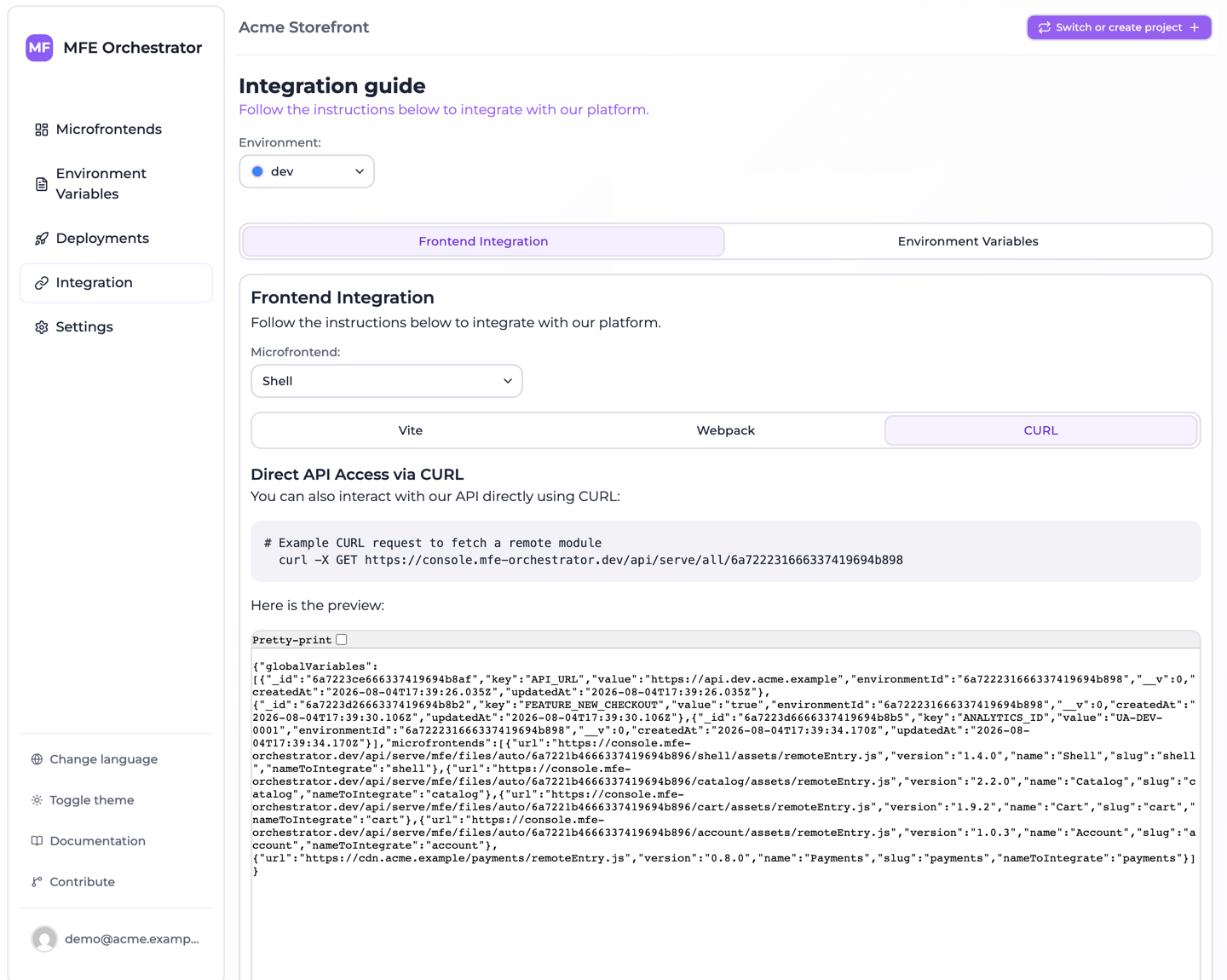
Unlike the rest of this page, this endpoint requires authentication. It is a convenience for tooling, not something your application calls at runtime.
Error responses
Branch on the code field, not on the message. The messages are written for a human reading a
log and get reworded as they get more helpful; code is the discriminator.
code | Status | Message | Cause |
|---|---|---|---|
ENTITY_NOT_FOUND | 404 | Entity not found with id Active deployment | The environment has never been deployed, or has no active deployment |
ENTITY_NOT_FOUND | 404 | Entity not found with id <slug or id> | No such microfrontend, or the microfrontend is absent from the deployment that answered |
ENVIRONMENT_NOT_FOUND | 404 | No environment of project <id> has "<domain>" among its registered domains, … | An auto form was called from a domain registered on no environment of that project |
ENVIRONMENT_NOT_FOUND | 404 | Environment not found: <slug or id> | An explicit slug or id form named an environment that does not exist |
PROJECT_NOT_FOUND | 404 | Project not found: <id> | The project id in the path is not a project of this console |
| none | 500 | Referer not found | A Referer-required endpoint was called with neither a Referer nor a Host header |
Note the shape of the first message: Active deployment is the entity id slotted into a generic
template, which is why it reads the way it does. There is no Active deployment not found message.
Referer not found is the odd one out. It is thrown as a plain error with no status attached, so it
surfaces as a 500 rather than as the 4xx its neighbours return, and it carries no code. Only
the two /serve/mfe/…/{mfeId}/… forms demand a Referer outright; the auto forms fall back to the
Host header first, so in practice only a request carrying neither reaches this.
A microfrontend that exists in the project but was added after the last deployment falls into the second row: deploy the environment to include it.
Building runtime discovery
Use the client SDK. It calls this endpoint for you, once per page load, with the identity parameters generated and persisted, and returns URLs you can hand straight to your federation runtime:
// src/main.js
import { configure, remoteUrl, globalVariables } from '@mfe-orchestrator-hub/client'

configure({ backendUrl: API_BASE, projectId: PROJECT_ID, environment: ENV_SLUG })
// environment is optional: drop it and the SDK calls the auto form instead,
// letting the domain decide which environment answers.

window.globalConfig = await globalVariables()

const catalog = await remoteUrl('catalog')   // already version-pinned, use as is

await import('./App')
The generated bundler configuration already goes through remoteUrl(), so in most hosts there is
nothing to write beyond the configure() call.
If you do call the endpoint yourself, remember what the SDK was written to get right: generate and
persist a session id and a device id, send them on every manifest request, and pass each url
through untouched.
With this in place, adding a remote to the host is a deployment rather than a release: the roster is discovered, not compiled in.