Read runtime configuration in the browser
This page shows how to read an environment's environment variables from the browser, so a single build can be configured differently in each stage.
The console generates both snippets with your ids already substituted, under Integration → Environment Variables.
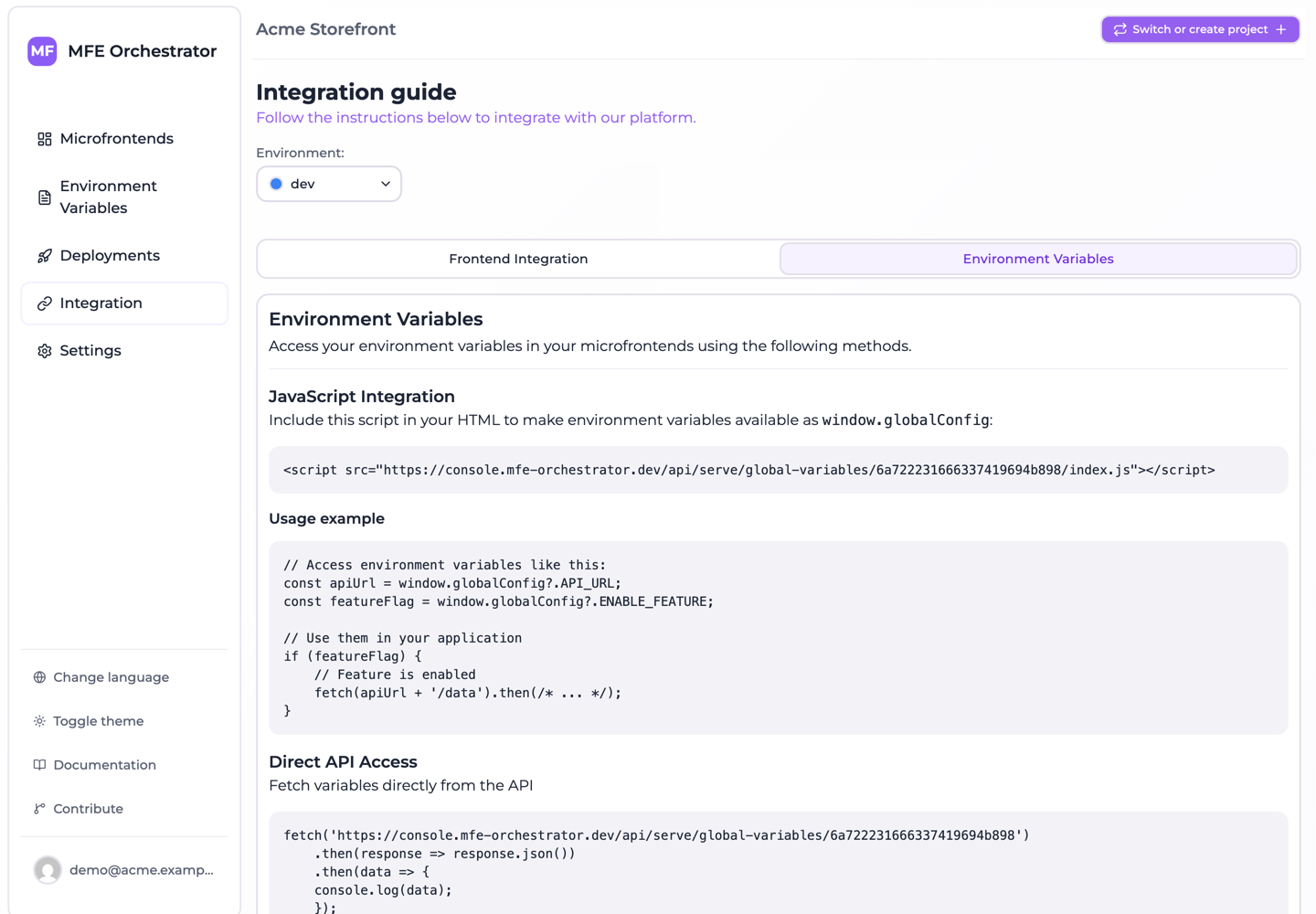
Option 1: the generated script
MFE Orchestrator can serve your variables as a JavaScript file that assigns them to
window.globalConfig. Add it to your index.html before your application bundle:
<!doctype html>
<html>
  <head>
    <script src="<API_BASE>/serve/global-variables/auto/<projectId>/index.js"></script>
  </head>
  <body>
    <div id="root"></div>
    <script type="module" src="/src/main.jsx"></script>
  </body>
</html>
The address names your project and no environment: the platform works out which one answers from
the domain the page is served on, so this index.html is the same file in every stage and a
promotion never means editing it. Addressing an environment explicitly
covers the cases where you do want to name one.
The served file looks like this:
window.globalConfig = {
  "API_URL": "https://api.example.com",
  "ENABLE_NEW_CHECKOUT": "true"
}
Then read it anywhere in your code:
const apiUrl = window.globalConfig?.API_URL
const featureFlag = window.globalConfig?.ENABLE_NEW_CHECKOUT === 'true'

if (featureFlag) {
  fetch(apiUrl + '/checkout/v2')
}
Because the script is a blocking <script> in <head>, window.globalConfig is guaranteed to
exist by the time your bundle runs — no loading state, no race.
Values are always strings
Everything comes back as a string, including "true", "false" and "0". Compare explicitly:
// ✅
const enabled = window.globalConfig?.ENABLE_NEW_CHECKOUT === 'true'

// ❌ "false" is truthy
const enabled = Boolean(window.globalConfig?.ENABLE_NEW_CHECKOUT)
A small typed accessor is worth writing once:
// config.ts
declare global {
  interface Window {
    globalConfig?: Record<string, string>
  }
}

const raw = window.globalConfig ?? {}

export const config = {
  apiUrl: raw.API_URL ?? 'http://localhost:8080',
  newCheckout: raw.ENABLE_NEW_CHECKOUT === 'true',
}
The fallbacks keep local development working without a <script> tag pointing at a deployed
environment.
Option 2: fetch the JSON
If you would rather control loading yourself:
const vars = await fetch('<API_BASE>/serve/global-variables/auto/<projectId>')
  .then(r => r.json())
// [{ _id: '68f1…', key: 'API_URL', value: 'https://api.example.com',
//    environmentId: '68f2…', createdAt: '…', updatedAt: '…' }, …]
Always an array, and key and value are always on every entry — but the entries are not the same
shape at every address:
| Address | Entry shape |
|---|---|
/serve/global-variables/{environmentId} | Exactly { key, value } |
/serve/global-variables/{projectId}/{environmentSlug} | The stored document: key, value, plus _id, environmentId, createdAt, updatedAt |
/serve/global-variables/auto/{projectId} | The stored document, as above |
globalVariables inside /serve/all/… | The stored document, as above |
Only the environment-id form maps the entries down to two fields. The other addresses — including the
auto form used above, and the one in the generated snippet — hand back the deployed documents as
they are stored. Read key and value and treat the rest as an implementation detail rather than a
contract. The conversion is the same either way:
const config = Object.fromEntries(vars.map(v => [v.key, v.value]))
The trade-off is that your application now has an asynchronous startup dependency: everything that reads configuration must wait for the fetch. Option 1 avoids that entirely, which is why it is the default recommendation.
How auto resolves
The auto address used by both snippets above carries no environment. The platform works out the
calling domain and matches it against the allowed domains of each
environment.
It does not do that by relying on the browser to send the page it is loading from. Under the default
referrer policy a cross-origin <script src> sends only the origin in Referer, and a request
with no referrer at all — a curl, a preload, a page under a stricter policy — sends none. So the
backend tries several forms of the calling domain in turn and accepts a match against any of them:
the Referer as received, then its origin, its host and its hostname, falling back to the request's
Host header when there is no Referer. Registering the bare hostname, ex. dev.example.com,
satisfies all of them.
It only works if the domain is actually registered on the intended environment: an unregistered domain has nothing to resolve against and the request fails rather than falling back to a default.
Addressing an environment explicitly
Name an environment when auto cannot decide for you — one domain serving several environments, a
build whose stage is already known, a curl from a machine that is not the deployed host. The JSON
form takes a project id and an environment slug, which are more readable and stable than an object
id; the index.js form is addressed by environment id:
<API_BASE>/serve/global-variables/<projectId>/<environmentSlug>
<API_BASE>/serve/global-variables/<environmentId>
<API_BASE>/serve/global-variables/<environmentId>/index.js
The cost of naming an environment in an index.html is that the artifact stops being portable:
promoting the build to the next stage becomes an edit of that file, which is exactly what auto
exists to avoid. Prefer it for anything you ship.
Where the values come from
Always from the active deployment of that environment — never from the draft configuration in the console. A variable you have added but not deployed is not served. This is the same rule that governs microfrontend versions, and it means a configuration rollback is just a redeploy.
Security
:::caution Public endpoint
/serve/global-variables/... is unauthenticated. Anyone with your project and environment id can
read every variable in it. Put only public configuration here — API base URLs, feature flags,
tracking ids, public keys. Never secrets.
:::
If you need secrets in the browser, you do not: move the operation that needs them behind your own backend.