Integration overview
So far everything has happened inside MFE Orchestrator. This section is about the other side: how your application actually consumes what you deployed.
The Integration page
Integration in the sidebar generates, for the selected environment, exactly the snippets your project needs — with your project id and the environment already filled in. The deployment id is not in any of them: it is a query parameter on the request that generates a snippet, nothing more. The page has two tabs:
| Tab | Contains |
|---|---|
| Frontend Integration | The generated bundler configuration, plus a curl example |
| Environment Variables | The snippets for reading runtime configuration in the browser |
The page needs the selected environment to have at least one deployment — not an active one. The
gate counts deployments, and the page then reads that environment's last deployment, the newest by
deployedAt, whether or not it happens to be the active one. If the environment has never been
deployed, deploy first: there is nothing to integrate against until then.
Pick a microfrontend from the selector at the top. It lists every microfrontend of that deployment,
hosts and remotes alike — nothing is filtered out. What the type changes is only whether the
generated config carries an exposes block; the remotes block comes from the microfrontend's
children in the relation graph, so one with no children simply gets none.
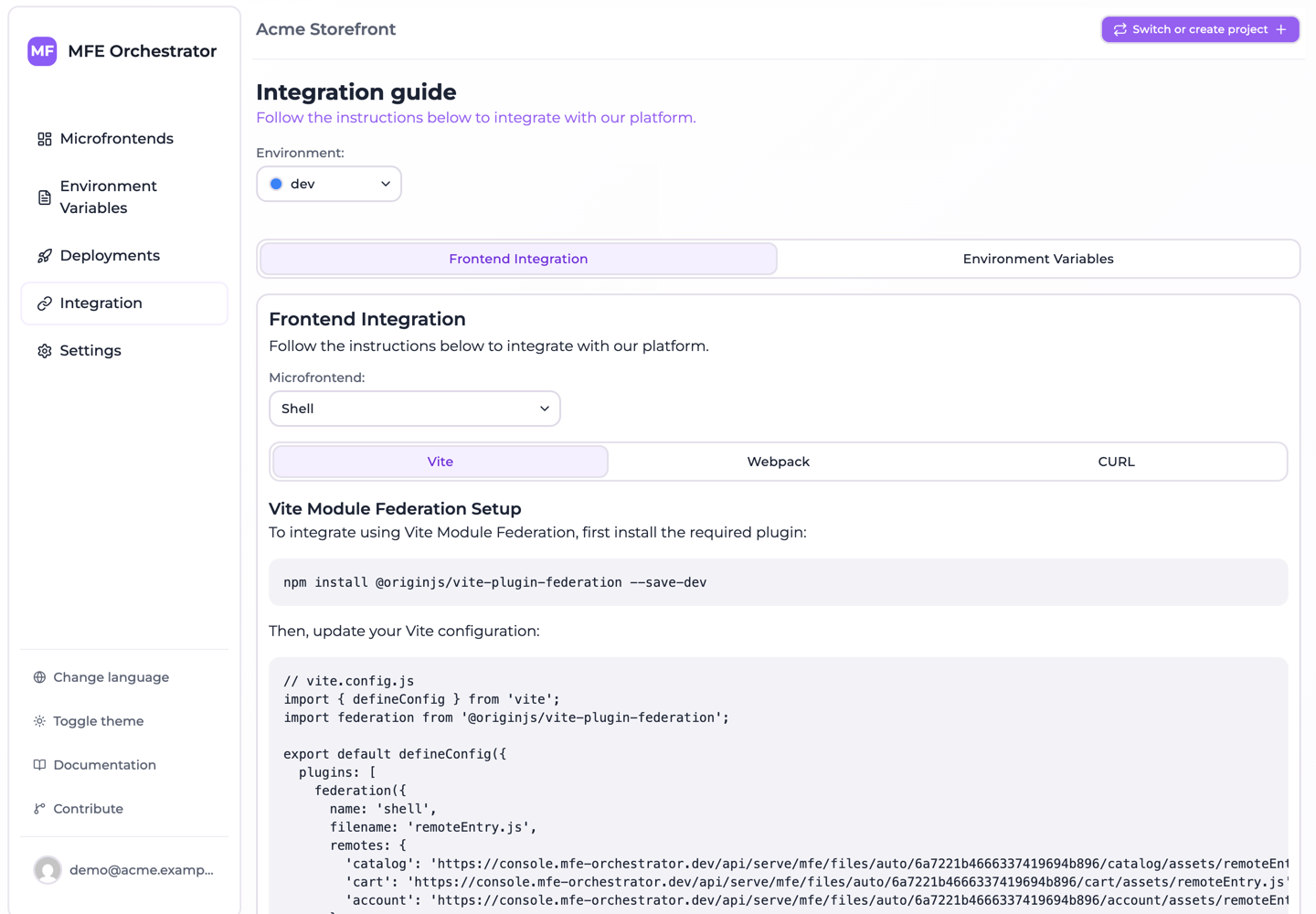
Choosing the stack
Inside the Frontend Integration tab there are two inner tabs, Module Federation and Direct API Access via CURL — one per integration model, described below. There are no per-bundler tabs.
The Module Federation tab has two selects instead, both defaulting to Automatic:
| Select | Options |
|---|---|
| Framework | Automatic, React, Vue, Angular |
| Bundler | Automatic, Vite, Webpack, Web Component |
Automatic means the stack stored on the microfrontend — taken from the template it was created from, detected in its repository, or set by hand — and a badge above the snippet says which of the three it was. The selects are overrides, for when detection got it wrong or when you want to read another stack's instructions. A microfrontend whose stack is unknown shows neither config nor error until you pick one.
Picking Web Component as the bundler produces no configuration at all: web component microfrontends are plain scripts registering a custom element, so there is nothing to write into a bundler config, and the tab shows a runtime-integration note in place of one.
The two integration models
There are two quite different ways to consume MFE Orchestrator, and the right choice depends on how dynamic you need to be.
Generated bundler configuration
The console generates the whole configuration file — not a remotes block to graft onto your
own — and tells you where it belongs, ex. vite.config.js. With it come an install line for what
that config needs and a commented-out bootstrap block for your entry point. What gets baked into your
host is not a URL: it is a call into the client SDK, which asks the serve API for the
URL of each remote at import time.
- Standard Module Federation, plus one
configure()call in your entry point - No version, no environment and no CDN path compiled in, so bumping a remote's version — or putting it behind a canary release — is just a deployment
- Which remotes the host knows about is still fixed at build time: adding or removing one requires a host rebuild
This is what the Module Federation tab gives you. Start here.
Runtime discovery
Your host asks the serve API at boot which remotes exist and where they are, then registers them dynamically.
- Adding a remote to a host needs no host rebuild — just a deployment
- Requires dynamic remote loading in your host, which Module Federation supports but does not do for you
- Costs one HTTP request during startup
This is what the Direct API Access via CURL tab is for: a single call to /serve/all/... returns
the whole environment — microfrontends with URLs and versions, plus the environment variables. The tab
shows the curl line for the selected environment and, underneath it, a live <iframe> preview of
/api/serve/all/{environmentId}, so you can read the real response without leaving the page. The
SDK's manifest() gives you the same thing without writing the fetch.
Most teams start with the generated configuration and move to runtime discovery when the roster of remotes starts changing often.
Writing the integration into your repositories
Rather than copy, paste and commit, you can have MFE Orchestrator write the integration into the repositories itself. Both tabs offer it, and the two are separate integrations that are never committed together:
| Tab | Button | Writes |
|---|---|---|
| Frontend Integration | Integrate my microfrontends | The bundler config of every microfrontend of the project that consumes others, plus the packages that config needs |
| Frontend Integration | Integrate only this one | The same, narrowed to the selected microfrontend |
| Environment Variables | Add the script to my hosts | The <script> tag for window.globalConfig, into the document of every host |
The buttons are always there: nothing is gated on the selected microfrontend's repository being connected. What each one opens is a dialog that first computes a plan for the whole project — because the remotes of one microfrontend are the other microfrontends of it — with narrowing deciding only what is shown and what can be committed.
The dialog then lists one row per repository with a status (already integrated, config to create, config to replace, no remotes to declare, stack unknown, integrates at runtime, no document to write into, error) and a diff you can expand to compare what is in the repository against what would be written. You tick the repositories to commit to, and the write lands on the default branch of each one. Rows the plan cannot act on cannot be ticked.
What the platform serves
Whatever integration model you choose, these are the things your application can ask for, from the resolved environment's deployment — the active one for everything except the file endpoints, which which deployment answers sets out:
| Ask | Endpoint family |
|---|---|
| Everything about this environment | /serve/all/... |
| Just the runtime variables | /serve/global-variables/... |
| One microfrontend's URL and version | /serve/mfe/config/... |
| A microfrontend's actual files | /serve/mfe/files/... |
These endpoints are public and unauthenticated — they are meant to be called from browsers. The complete reference is in Serve API.
Each family can be addressed either with the environment named in the path, or through an auto
form that carries only the project id and lets the platform resolve the environment from the
request's domain. The second is what makes one host build usable in every stage, and what the SDK
falls back to when configure() is called without an environment — at the cost of depending on
the allowed domains being right.
Where to go next
- Client SDK —
@mfe-orchestrator-hub/client, which the generated configuration delegates remote resolution to - Vite —
@originjs/vite-plugin-federation - Webpack —
ModuleFederationPlugin - Runtime configuration — reading environment variables in the browser
- Serve API — the full public endpoint reference