Module Federation with Webpack
MFE Orchestrator generates configuration for Webpack 5's built-in
ModuleFederationPlugin. No extra dependency is needed — Module Federation ships with Webpack 5.
Configure a remote
A remote declares what it exposes; this is plain Module Federation with no MFE Orchestrator involvement:
// webpack.config.js
const { ModuleFederationPlugin } = require('webpack').container;

module.exports = {
  // ... other webpack config
  plugins: [
    new ModuleFederationPlugin({
      name: 'catalog',
      filename: 'remoteEntry.js',
      exposes: {
        './App': './src/App',
        './Button': './src/components/Button'
      },
      shared: {
        react: { singleton: true, requiredVersion: '^18.2.0' },
        'react-dom': { singleton: true, requiredVersion: '^18.2.0' }
      },
    }),
  ],
};
Webpack writes remoteEntry.js to the root of your output directory, so the microfrontend's
Entry Point in MFE Orchestrator should read remoteEntry.js — unless you have customised
output.publicPath or the filename.
:::caution remoteEntry.js is not a default you can rely on
Nothing in the platform defaults that field to remoteEntry.js. The microfrontend model stores no
default, and when the field is empty the serving path falls back to index.js. Where
remoteEntry.js appears without you typing it, it came from the marketplace entry of the Webpack
template the microfrontend was created from. Create the microfrontend with Create From Scratch
and the form pre-fills assets/remoteEntry.js instead — the Vite output layout, wrong for a
Webpack build. Check the field rather than assuming it.
:::
Configure the host
Open Integration → Frontend Integration, select your host, set Bundler to Webpack (or leave it on Automatic if that is the microfrontend's stored stack) and copy the Module Federation tab:
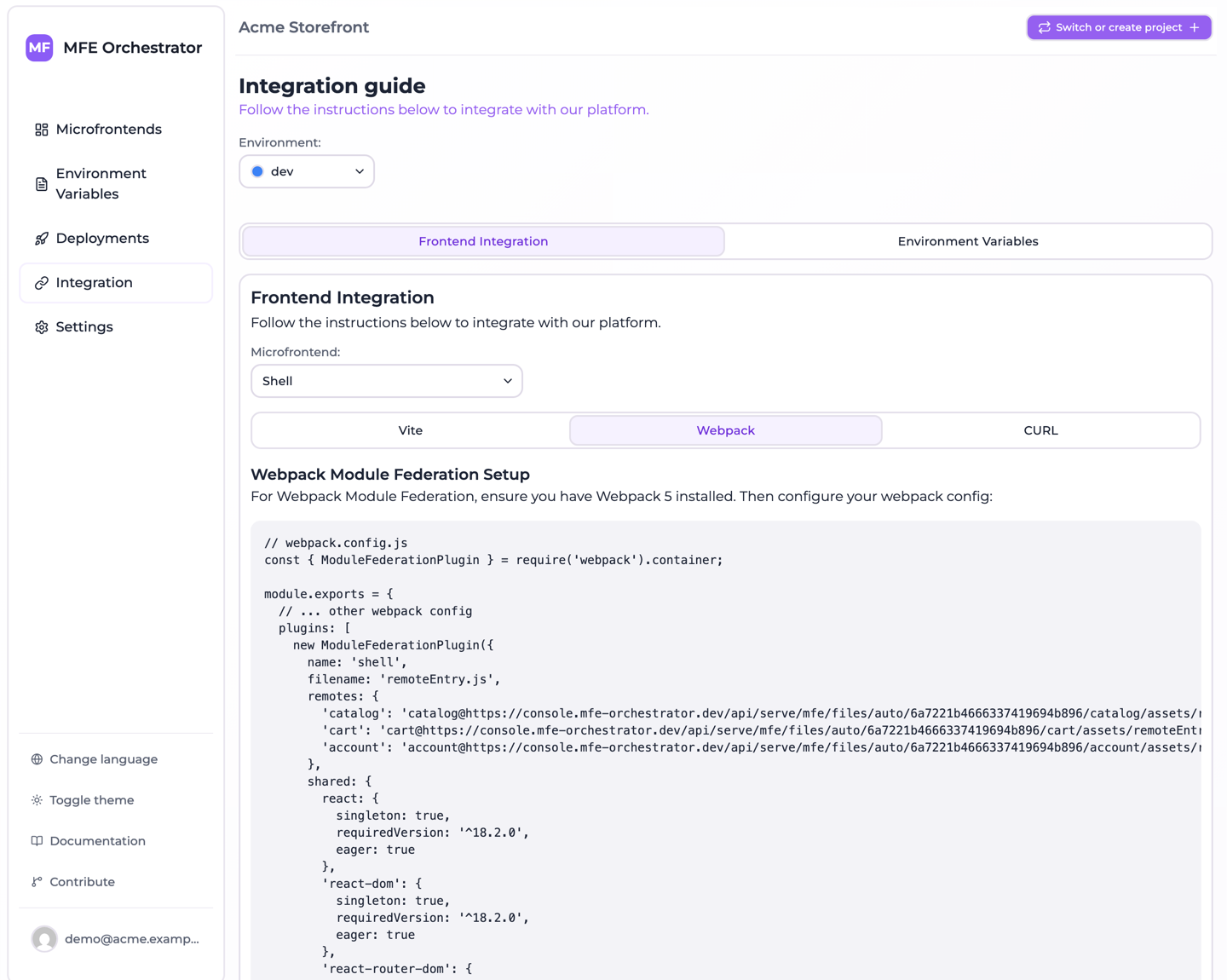
// webpack.config.js
const webpack = require('webpack');
const { ModuleFederationPlugin } = webpack.container;

module.exports = {
  // ... other webpack config
  plugins: [
    new webpack.DefinePlugin({
      'process.env.MFE_BACKEND_URL': JSON.stringify("https://console.mfe-orchestrator.dev/api"),
      'process.env.MFE_PROJECT_ID': JSON.stringify("68f1a2..."),
      // DefinePlugin pastes the text on the right into the bundle verbatim, so the bare
      // identifier `undefined` is what an unset environment looks like: the SDK then resolves
      // it from the domain the page is served on. Pin this build to one environment by
      // replacing it with a quoted slug, ex. JSON.stringify('DEV').
      'process.env.MFE_ENVIRONMENT': 'undefined'
    }),
    new ModuleFederationPlugin({
      name: 'shell',
      filename: 'remoteEntry.js',
      remotes: {
        'catalog': `promise import('@mfe-orchestrator-hub/client').then(m => m.remoteUrl('catalog'))`,
        'cart': `promise import('@mfe-orchestrator-hub/client').then(m => m.remoteUrl('cart'))`
      },
      shared: {
        react: {
          singleton: true,
          requiredVersion: '^18.2.0',
          eager: true
        },
        'react-dom': {
          singleton: true,
          requiredVersion: '^18.2.0',
          eager: true
        },
        'react-router-dom': {
          singleton: true,
          requiredVersion: '^6.15.0',
          eager: true
        }
      },
    }),
  ],
};

// ---------------------------------------------------------------------------
// Host bootstrap: paste this at the very top of your entry point (src/index.ts).
// The remotes above ask the SDK for their url, so configure() has to run before
// anything imports one of them.
// The backend url and the project id are already in the config above, written into
// the bundle by DefinePlugin: there is no .env to fill in. Only the environment is
// left to read, and it is optional.
// ---------------------------------------------------------------------------
/*
import { configure } from '@mfe-orchestrator-hub/client'

// Optional: leave it unset and the environment is resolved from the domain this
// page is served on, so the same build can run on every environment.
const environment = process.env.MFE_ENVIRONMENT

configure({
  backendUrl: process.env.MFE_BACKEND_URL,
  projectId: process.env.MFE_PROJECT_ID,
  // Only a canary targeted on users reads this, and nothing else can supply it.
  // A getter is resolved right before the request, so an auth round trip is in
  // time; later than that, use setUserId(). Without it those microfrontends
  // serve everyone the stable version.
  // userId: () => auth.currentUser?.id,
  ...(environment ? { environment } : {})
})
*/
promise <expression> is how ModuleFederationPlugin declares a remote whose URL is only known at
runtime: the expression is inlined into your host bundle and awaited before the remote is used. The
URL comes from the client SDK, which is referenced by bare specifier and resolved
by your own bundler.
So the generated configuration contains no URL — no version, no environment, no CDN path. That is what keeps the resolution server-side and lets a canary release decide which version this browser receives. See Allowed domains for how the environment is resolved.
Two things you have to do yourself:
npm install @mfe-orchestrator-hub/client
and uncomment the bootstrap block at the bottom into your entry point, before anything imports a
remote. The console emits it commented out precisely because it does not belong in
webpack.config.js.
There is no .env to fill in
MFE_BACKEND_URL and MFE_PROJECT_ID are not variables you set, and you do not need
webpack.EnvironmentPlugin to expose them. The console writes their values into the DefinePlugin
call of the generated config, which is the file you commit, so a fresh clone builds a bundle that
already knows which console to ask and which project to ask about — and no unset variable can turn
into a build that fails only once it is running in a browser.
They are defined as process.env.* names rather than inlined into configure() so that the
bootstrap snippet reads the same names a real environment would have populated: moving the values
into the config changes where they come from, not the code that consumes them. If you would rather
feed them from the environment, replace those two entries with your own plugin — but do it
deliberately, because while they are there nothing else is read.
MFE_ENVIRONMENT is defined too, as the bare identifier undefined. That third entry is not
cosmetic: webpack leaves process.env.X untouched when nothing defines it, process does not exist
in a browser, and the optional variable the bootstrap snippet reads would therefore throw instead of
being undefined. To pin the build to one environment, replace 'undefined' with
JSON.stringify('DEV').
Left as undefined, environment is spread out of the configure() call entirely and the SDK asks
the serve API without a slug, leaving the choice to the
allowed domains registered on your environments — one build, correct on
every stage. In exchange, each stage's domain has to be registered on the right environment, or the
manifest request fails rather than falling back to anything. See
leaving the environment out.
:::caution Do not turn the spread into a plain field
environment: process.env.MFE_ENVIRONMENT reads more simply, and it is the shape that makes people
believe the value is required. It is also fragile: swap the generated DefinePlugin entry for
webpack.EnvironmentPlugin and an MFE_ENVIRONMENT= line, and the field becomes '', which the
core accepts, warns about, and then ignores in favour of the auto routes anyway. Spreading the key
in only when it holds something is correct under either plugin.
:::
:::note If you pin a remote by hand
Webpack's static remote syntax is name@url, not a bare URL as Vite uses. You will not see it in
the generated configuration any more, but it is what you need if you ever hard-code a remote —
along with the understanding that you have just frozen one version into your host.
:::
Remote names
The remote name is derived from the slug by replacing every / with _ and removing every -:
| Slug | Key to import from |
|---|---|
catalog | catalog |
product-catalog | productcatalog |
shop/catalog | shop_catalog |
Consume a remote
import React, { Suspense, lazy } from 'react'

const CatalogApp = lazy(() => import('catalog/App'))

export default function App() {
  return (
    <Suspense fallback={<div>Loading…</div>}>
      <CatalogApp />
    </Suspense>
  )
}
About eager: true
The generated host configuration marks shared dependencies as eager: true, which bundles them
into the host's initial chunk instead of loading them asynchronously. This trades a larger initial
bundle for a simpler startup: no async boundary is required before your first import.
If you would rather keep the initial bundle small, drop eager and wrap your entry point in an
async boundary:
// index.js
import('./bootstrap')
// bootstrap.js
import React from 'react'
import { createRoot } from 'react-dom/client'
import App from './App'

createRoot(document.getElementById('root')).render(<App />)
This is the standard Module Federation pattern, and it is what you want in a production host with a meaningful bundle-size budget.
Version mismatches
requiredVersion with singleton: true makes Webpack warn at runtime when a remote wants a
different major version of a shared library than the host provides. Those warnings are worth
taking seriously — a satisfied-but-mismatched React is the source of most confusing microfrontend
bugs. Keep shared library versions aligned across the graph, and upgrade hosts and remotes
together.