Module Federation with Vite
MFE Orchestrator generates configuration for
@originjs/vite-plugin-federation, the
Module Federation implementation for Vite. This is the setup used by the Vite templates in the
templates library.
Install the plugin
In both hosts and remotes:
npm install @originjs/vite-plugin-federation --save-dev
Configure a remote
A remote declares what it exposes. This does not involve MFE Orchestrator at all — it is ordinary Module Federation:
// vite.config.js
import { defineConfig } from 'vite'
import react from '@vitejs/plugin-react'
import federation from '@originjs/vite-plugin-federation'

export default defineConfig({
  plugins: [
    react(),
    federation({
      name: 'catalog',
      filename: 'remoteEntry.js',
      exposes: {
        './App': './src/App',
        './Button': './src/components/Button'
      },
      shared: ['react', 'react-dom']
    })
  ],
  build: {
    modulePreload: false,
    target: 'esnext',
    minify: false,
    cssCodeSplit: false
  }
})
:::caution Build settings are not optional
target: 'esnext' is required — Module Federation relies on top-level await. minify: false and
cssCodeSplit: false avoid known issues with the plugin's chunk rewriting. The templates ship
with these already set; if you configure a remote by hand, keep them.
:::
The built remoteEntry.js lands in dist/assets/, so set the microfrontend's Entry Point in
MFE Orchestrator to assets/remoteEntry.js.
Configure the host
This is the part MFE Orchestrator generates. Open Integration → Frontend Integration, select your host, set Bundler to Vite (or leave it on Automatic if that is the microfrontend's stored stack) and copy the Module Federation tab:
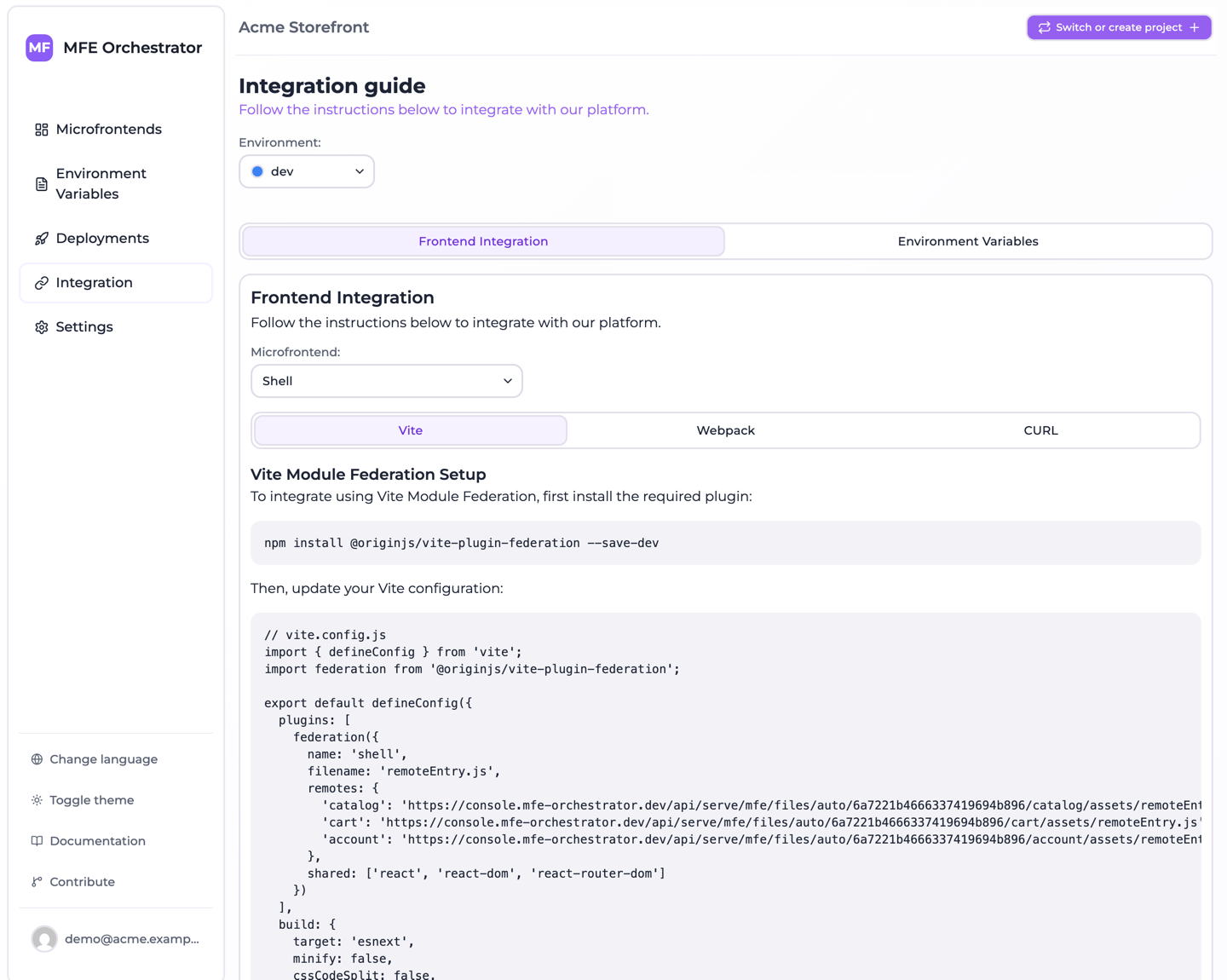
// vite.config.js
import { defineConfig } from 'vite';
import federation from '@originjs/vite-plugin-federation';

export default defineConfig({
  plugins: [
    federation({
      name: 'shell',
      filename: 'remoteEntry.js',
      remotes: {
        'catalog': {
          external: `import('@mfe-orchestrator-hub/client').then(m => m.remoteUrl('catalog'))`,
          externalType: 'promise'
        },
        'cart': {
          external: `import('@mfe-orchestrator-hub/client').then(m => m.remoteUrl('cart'))`,
          externalType: 'promise'
        }
      },
      shared: ['react', 'react-dom']
    })
  ],
  define: {
    'import.meta.env.VITE_MFE_BACKEND_URL': JSON.stringify("https://console.mfe-orchestrator.dev/api"),
    'import.meta.env.VITE_MFE_PROJECT_ID': JSON.stringify("68f1a2...")
  },
  build: {
    modulePreload: false,
    target: 'esnext',
    minify: false,
    cssCodeSplit: false
  }
})

// ---------------------------------------------------------------------------
// Host bootstrap: paste this at the very top of your entry point (src/main.tsx).
// The remotes above ask the SDK for their url, so configure() has to run before
// anything imports one of them.
// The backend url and the project id are already in the config above, written into
// the bundle by the `define` block: there is no .env to fill in. Only the environment is
// left to read, and it is optional.
// ---------------------------------------------------------------------------
/*
import { configure } from '@mfe-orchestrator-hub/client'

// Optional: leave it unset and the environment is resolved from the domain this
// page is served on, so the same build can run on every environment.
const environment = import.meta.env.VITE_MFE_ENVIRONMENT

configure({
  backendUrl: import.meta.env.VITE_MFE_BACKEND_URL,
  projectId: import.meta.env.VITE_MFE_PROJECT_ID,
  // Only a canary targeted on users reads this, and nothing else can supply it.
  // A getter is resolved right before the request, so an auth round trip is in
  // time; later than that, use setUserId(). Without it those microfrontends
  // serve everyone the stable version.
  // userId: () => auth.currentUser?.id,
  ...(environment ? { environment } : {})
})
*/
The remotes block is derived from your relation graph: one entry per child of the selected host.
Note that it holds no URL at all. externalType: 'promise' tells the plugin that external is
an expression resolving to the URL rather than the URL itself, so it is evaluated in your bundle at
import time and the URL comes from the client SDK.
That is what keeps the resolution server-side: neither a version, nor an environment, nor a fixed CDN path is compiled into your host, so the configuration survives version bumps, works unchanged across environments, and lets a canary release decide which version this browser receives. See Allowed domains for how the environment is resolved.
Two things you have to do yourself:
npm install @mfe-orchestrator-hub/client
and uncomment the bootstrap block at the bottom into your entry point, before anything imports a
remote. The console emits it commented out precisely because it does not belong in vite.config.js.
There is no .env to fill in
VITE_MFE_BACKEND_URL and VITE_MFE_PROJECT_ID are not variables you set. The console writes
their values into the define block of the generated config, which is the file you commit, so a
fresh clone builds a bundle that already knows which console to ask and which project to ask about —
and no unset variable can turn into a build that fails only once it is running in a browser.
They are emitted as define entries rather than as literals inside configure() so that the
bootstrap snippet reads the same import.meta.env names a .env would have populated: moving the
values into the config changes where they come from, not the code that consumes them. If you would
rather feed them from a real .env, delete the two define entries — but delete them deliberately,
because while the block is there a .env is simply not read.
VITE_MFE_ENVIRONMENT is the one variable left, and it is optional. Leave environment out of
configure() — which is what ...(environment ? { environment } : {}) does when the variable is
unset or empty — and the SDK asks the serve API without a slug, letting the
allowed domains of your environments decide which one answers, so a
single build behaves correctly on every stage. The catch is that the domain each stage is served from
must be registered on the matching environment, or the manifest request fails outright instead of
falling back. Set it if you would rather have the environment fixed at build time; the
client SDK page walks through the trade-off.
:::caution Do not turn the spread into a plain field
environment: import.meta.env.VITE_MFE_ENVIRONMENT reads more simply and behaves worse. Vite has two
ways of saying not set: a variable missing from .env arrives as undefined, one declared with no
value arrives as ''. The second is the trap — environment: '' is a value the core accepts, logs a
warning about, and then ignores in favour of the auto routes anyway. Spreading the key in only when
it holds something covers both.
:::
Remote names
The keys in remotes come from the microfrontend slug with every / replaced by _ and every -
removed:
| Slug | Key to import from |
|---|---|
catalog | catalog |
product-catalog | productcatalog |
shop/catalog | shop_catalog |
Consume a remote
import React, { Suspense, lazy } from 'react'

const CatalogApp = lazy(() => import('catalog/App'))

export default function App() {
  return (
    <Suspense fallback={<div>Loading…</div>}>
      <CatalogApp />
    </Suspense>
  )
}
For TypeScript, declare the remote modules — the plugin cannot generate types across the boundary:
// remotes.d.ts
declare module 'catalog/App' {
  const Component: React.ComponentType
  export default Component
}
Shared dependencies
The generated host config shares the framework core only — react and react-dom for a React host,
vue for Vue, @angular/core, @angular/common, @angular/platform-browser and rxjs for Angular
— and pins no requiredVersion, so federation reads the range out of your own package.json. Keep
the shared list consistent across every microfrontend in the graph: a library shared by the host but
not by a remote gets loaded twice, and for React that means broken hooks rather than a clear error.
If you share other libraries — a state manager, a design system — add them to the shared array
everywhere.
Development
vite dev does not serve federated remotes: @originjs/vite-plugin-federation only emits
remoteEntry.js on vite build. To develop a host against a remote, either
- run
vite build && vite previewin the remote, or - point the host at the deployed remote in your development environment and let MFE Orchestrator serve it.
The second option is usually more pleasant — you develop the host against exactly what is deployed, and only rebuild the remote you are actually changing.