Core concepts and object model
Before diving into the individual features, it helps to understand the handful of objects MFE Orchestrator is built around. Everything you do in the console — and every call you make to the API — maps onto one of them.
:::tip Prefer a picture? Architecture draws the same objects as running components: the orchestrator, its database, the storage options and how a deployment reaches each environment. :::
The object model
Organization
├── Members (Owner, Admin, Member)
└── Project
    ├── Environment (dev, uat, prod, …)
    │   ├── Environment Variables (key/value, per environment)
    │   └── Deployment #1, #2, #3 …  (immutable snapshots)
    ├── Microfrontend (host or remote)
    │   └── Built version (one record per bundle uploaded)
    ├── Storage / Bucket (S3, Azure Blob, GCS)
    ├── Code Repository (GitHub, GitLab, Azure DevOps)
    ├── API Key (for CI/CD and automation)
    └── Members (Admin, Editor, Viewer)
One line in that tree is worth expanding, because the console does not spell it out. A
microfrontend carries a single version field: the version currently selected, the one the next
deployment would freeze. The versions you can select are separate records, one per bundle that has
reached the platform, keyed by microfrontend and version string. That is why the version of a
microfrontend is a list you pick from rather than free text, and why a version stays selectable long
after another has been deployed over it.
Organization
An organization is the tenant that owns projects. A project belongs to exactly one organization,
and a user can belong to any number of them with a different role in each. It is the level that
decides which projects a person can reach at all: whoever administers the organization
(OWNER, ADMIN) reaches every project inside it, while a plain MEMBER reaches only the projects
they were explicitly invited to.
The organization is selected in the console header, and it scopes everything below it — the project switcher only offers projects of the organization you are in. See Organizations.
Project
A project is the container every configuration object belongs to, and the boundary the project
roles are written against: microfrontends, environments, storages, repositories and API keys belong
to exactly one project. A project has a name, a slug and an id — all three, plus its free-text
description, live under Settings → Project Information. Two more fields are not editable
there: the organizationId of the organization that owns it, fixed at creation, and an isActive
flag.
Access to a project is granted either by an explicit project membership or by administering the organization that owns it — see Organization roles and project visibility.
When you call the API directly, the project is selected with the project-id HTTP header.
Environment
An environment is a deployment stage inside a project — typically dev, uat and prod,
but you can define as many as you like. Each environment has:
| Field | Purpose |
|---|---|
name | Display name, e.g. Production |
description | Free text |
slug | URL-friendly identifier used in the public serve API, e.g. prod |
color | Colour used to tag the environment throughout the console |
isProduction | Marks the environment as a production stage |
domains | The domains your application is served from — used to resolve which environment a browser request belongs to |
order | Sort order in the environment selector |
The slug is unique within a project.
:::info Why domains matter
Some public endpoints resolve the environment automatically from the browser's Referer
header, by matching it against the environment's Allowed Domains. This is what lets a
single microfrontend URL serve the right version to app.example.com and to
staging.example.com. See Environments → Allowed domains.
:::
Microfrontend
A microfrontend is a versioned frontend bundle registered in a project. It is either:
- a host — the shell application that loads other microfrontends, or
- a remote — a microfrontend consumed by a host.
Hosts and remotes are wired together by declaring parent/child relations in the console, and
MFE Orchestrator turns those relations into the remotes block of your Module Federation
configuration.
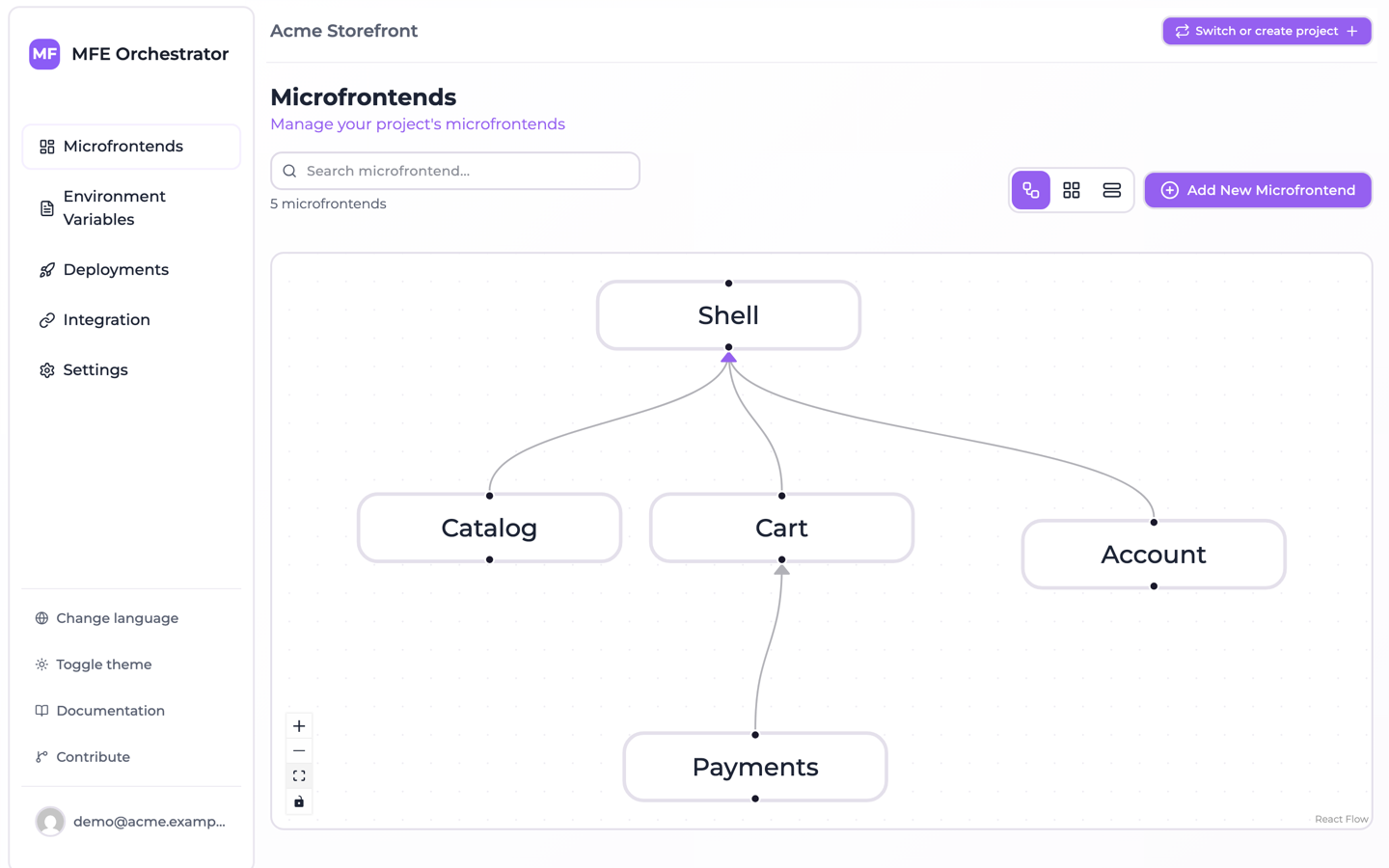
Each microfrontend has a slug (unique per project), a version, and a hosting type that
tells the platform where its files actually live. See
Microfrontends → Hosting options.
Environment variable
An environment variable (also called a global variable) is a key/value pair scoped to
a single environment. Unlike build-time variables baked into your bundle, these are read at
runtime by the browser, which means the same artifact can be promoted from uat to prod
without a rebuild. See Runtime configuration.
Storage (bucket)
A storage is a connection to an object storage bucket you own — Amazon S3, Azure Blob Storage or Google Cloud Storage. Microfrontend builds can be uploaded to your own bucket instead of to the hub, which keeps your artifacts inside your own cloud account. See Buckets.
Code repository
A code repository is a connection to GitHub, GitLab or Azure DevOps. With one connected, MFE Orchestrator can scaffold a new repository from a template, inject a build pipeline, and create the deploy secret the pipeline needs. See Code Repositories.
Deployment
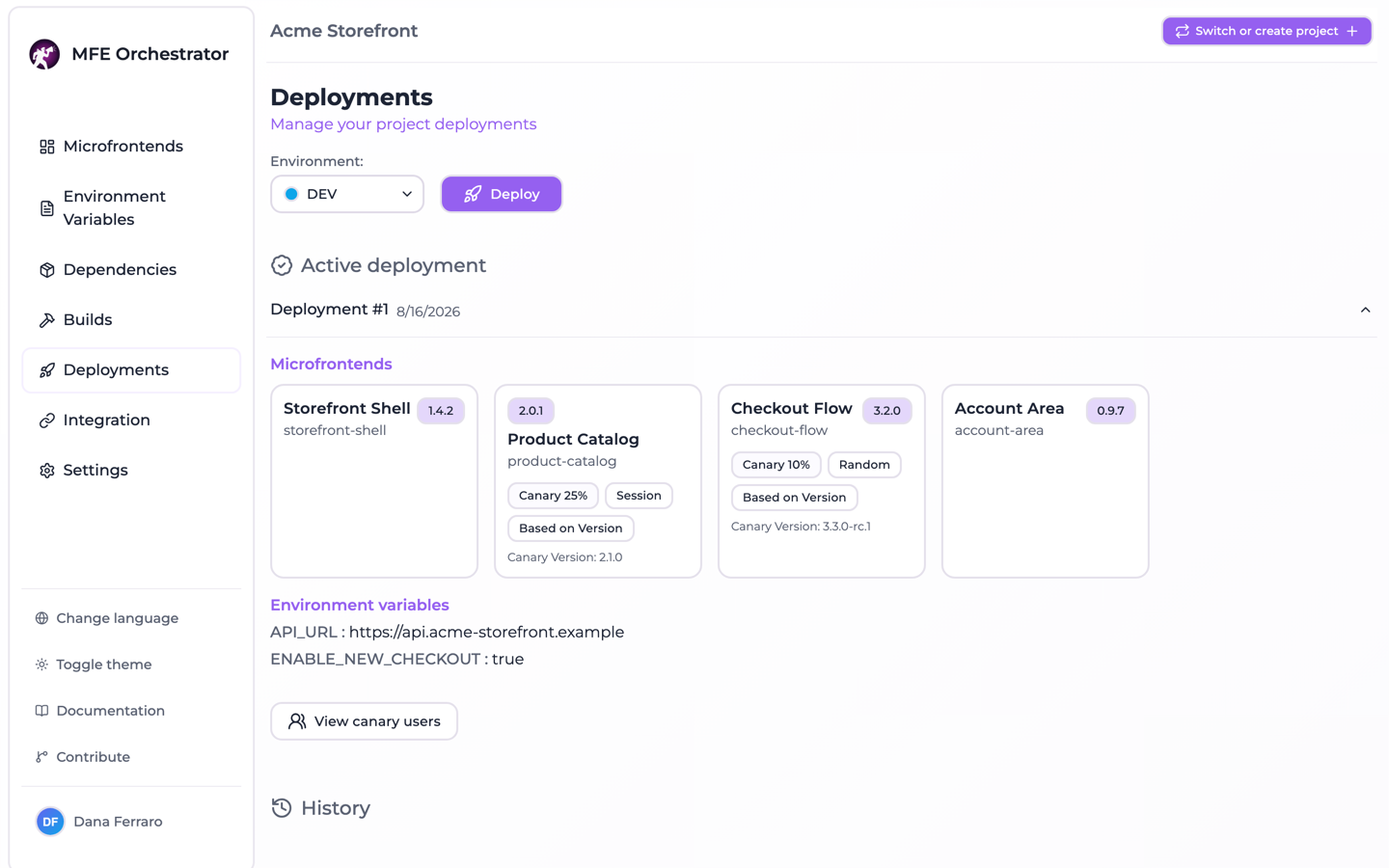
A deployment is an immutable snapshot of everything an environment needs at a point in time: the full list of microfrontends with their versions and hosting configuration, the environment's variables, and the storage configuration.
This is the single most important idea in MFE Orchestrator:
:::tip Editing is not deploying Changing a microfrontend's version, adding a variable, or connecting a bucket does not affect what your users see. Those changes sit in the project configuration until you press Deploy, which freezes them into a new snapshot and activates it. :::
Deployments are numbered per environment (#1, #2, #3 …) and exactly one of them is
active at any time. Because a snapshot is immutable, rolling back is just a matter of
re-activating an older one. See Deployments.
API key
An API key authenticates machines rather than people — CI pipelines, scripts, deploy jobs.
Keys are project-scoped, and they are shown once at creation and stored hashed. They also carry a
role and an expiry date, neither of which is currently enforced: the create form asks for a name and
an expiry only, the role defaults to MANAGER and is never read when a request is authorized, and
the check that resolves a key to its project looks at neither the expiry nor the status. Treat a key
as full access to its project for as long as it exists, and see
API Keys.
Members and roles
Membership is recorded at two levels, and both are checked.
At organization level, the role decides which projects a person reaches:
| Role | In the API | Reaches |
|---|---|---|
| Owner | OWNER | Every project of the organization; can also delete it and hand over ownership |
| Admin | ADMIN | Every project of the organization; can manage members and create projects |
| Member | MEMBER | Only the projects they were invited to |
At project level, the role decides what they can do inside one:
| Role | In the API | Can do |
|---|---|---|
| Admin | OWNER | Everything, including managing members and deleting the project |
| Editor | MEMBER | Manage microfrontends, variables, storages and deployments |
| Viewer | VIEWER | Read-only access |
See Roles and project visibility and Members and roles.
The lifecycle of a change
Putting it together, this is the path a code change takes from commit to browser:
1. Commit                Your microfrontend repository
      │
2. Build & upload        CI builds the bundle and uploads it to
      │                  MFE Orchestrator (hub or your own bucket),
      │                  tagged with a version
      │
3. Register version      The version becomes selectable on the
      │                  microfrontend in the console
      │
4. Deploy                You create a deployment for an environment,
      │                  snapshotting versions + variables
      │
5. Serve                 The host application asks the public serve API
                         which URLs to load; the active deployment answers
Steps 2 and 3 are automated by the pipelines MFE Orchestrator injects into your repository — see CI/CD. Step 5 is described in Integration.
Two ways to run the platform
Everything above applies identically whether you use the hosted console at console.mfe-orchestrator.dev or run the container yourself. The only difference is the base URL of the API:
| Setup | API base URL |
|---|---|
| Hosted console | https://console.mfe-orchestrator.dev/api |
| Self-hosted | <FRONTEND_URL>/api, or BACKEND_URL if you set it explicitly |
Throughout this documentation, <API_BASE> refers to whichever of the two applies to you.